




Na Bluetooth ea iPhone e Lula e Khaotsa ho Hokahana? Leka Litharollo Tsena

Bluetooth ke e 'ngoe ea likarolo tse bonolo ka ho fetisisa ho iPhone, e lumellang basebelisi ho hokela li-headphone tse se nang mohala, libui, li-smartwatches, litsamaiso tsa molumo oa koloi, li-keyboard le lisebelisoa tse ling tse ngata. Ebang u mametse 'mino ka AirPods, u etsa mehala e sa hlokeng matsoho ka koloing ea hau, kapa u hokahanya data le sesebelisoa se aparoang, Bluetooth e bapala karolo ea bohlokoa phihlelong eohle ea iPhone.
Leha ho le jwalo, basebedisi ba bangata ba iPhone ka dinako tse ding ba kopana le bothata bo ferekanyang: Bluetooth e dula e kgaola ka tshohanyetso. Kgokelo e ka nna ya theoha metsotso e meng le e meng e mmalwa, ya hloleha nakong ya ho bapala modumo, kapa ya hokela le ho kgaola kgafetsa disebedisweng tse kopaneng. Ditshitiso tsena di ka ama tlhahiso, boithabiso le puisano.
Ka lehlohonolo, mathata a mangata a khokahano ea Bluetooth a ka rarolloa ka mehato e 'maloa ea ho rarolla mathata. Tataisong ena, re tla hlalosa hore na ke hobane'ng ha Bluetooth ea iPhone ea hau e lula e sa khone ho hokela le ho u tataisa litharollong tse 'maloa tse sebetsang.
1. Ke Hobaneng ha Bluetooth ea iPhone e Lula e Khaoha?
Mathata a khokahano ea Bluetooth ho iPhone a ka hlaha ka mabaka a fapaneng, ho kenyeletsoa:
- Mathata a nakoana a software ho iOS
- Mefuta ea iOS e siiloeng ke nako
- Litlhophiso tsa Bluetooth tse senyehileng
- Maemo a tlase a betri disebedisweng tse hokahantsweng
- Tšitiso e se nang mohala e tsoang ho lisebelisoa tsa elektroniki tse haufi
- Mathata a ho lumellana pakeng tsa iPhone le sesebelisoa sa Bluetooth
- Likhohlano tsa litlhophiso tsa marang-rang
- Liphoso tsa boemo ba sistimi tse amang lits'ebeletso tsa Bluetooth
Maemong a mangata, bothata bo amana le software ho ena le hardware, ho bolelang hore hangata bo ka lokisoa ntle le ho nkela sesebediswa sa hao sebaka.
2. Mokhoa oa ho rarolla bothata ba Bluetooth ea iPhone e lula e sa khone ho hokela
Pele o leka ditharollo tse tswetseng pele, sebetsa ka mekgwa e latelang ya ho rarolla mathata.
2.1 Tima Bluetooth 'me u e bulele hape
Tharollo e bonolo ka ho fetisisa hangata ke eona e sebetsang ka ho fetisisa.
- Bula Litlhophiso ebe o tlanya bluetooth .
- Tima Bluetooth; Ema metsotsoana e ka bang 30 ebe o bulela Bluetooth hape.
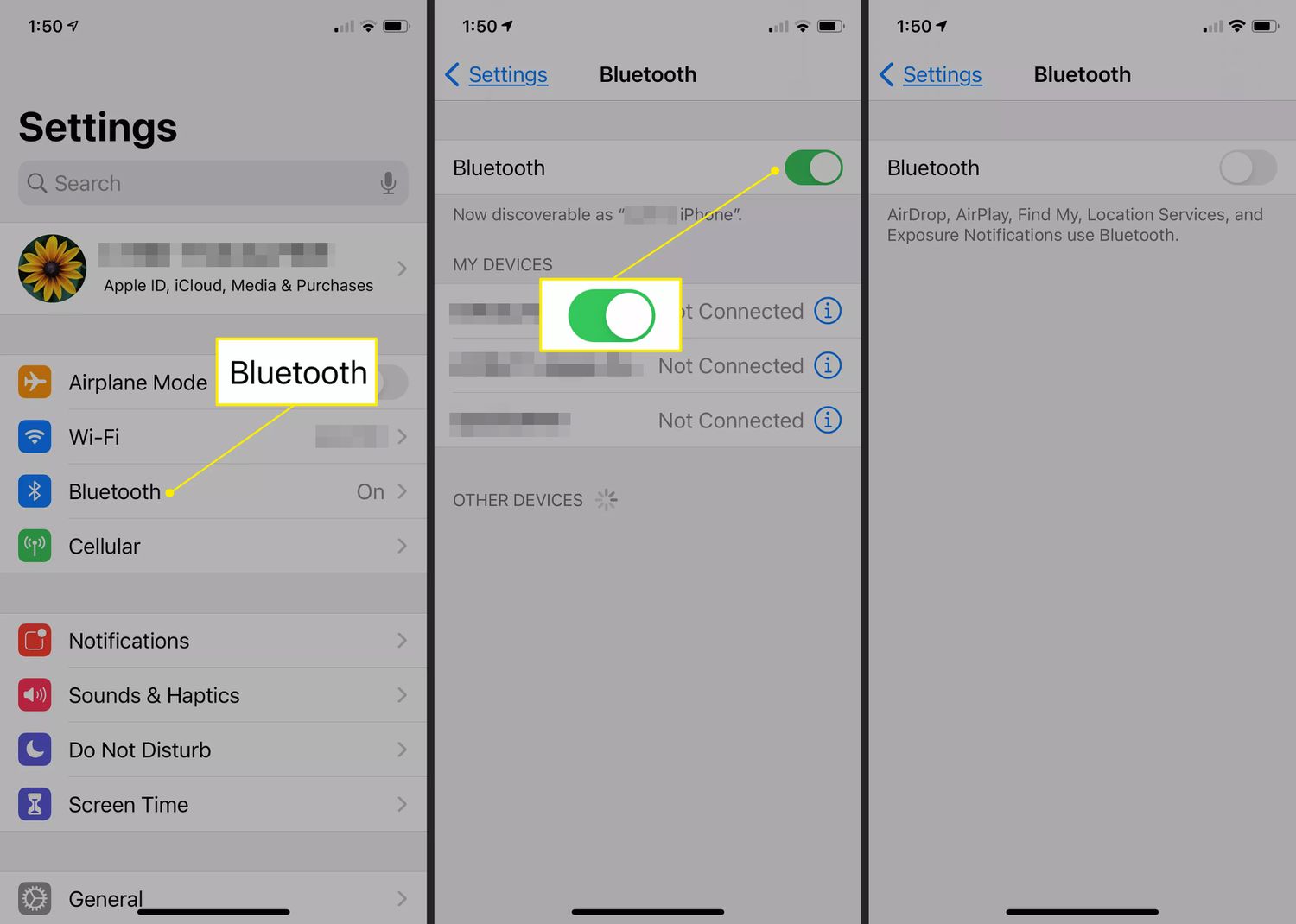
Hape o ka sebedisa Setsi sa Taolo ho tima le ho bulela Bluetooth hape kapele.
Sena se ntlafatsa khokahano ea Bluetooth 'me se ka felisa liphoso tsa nakoana tsa puisano.
2.2 Restart hao iPhone
Ho qala botjha ha bonolo feela ho ka hlakola diphoso tsa software tsa nakwana tse sitisang tshebetso ya Bluetooth.
Bakeng sa li-iPhone tse ncha:
- Tobetsa o be o tshware konopo ya Lehlakoreng hammoho le konopo ya Modumo ho fihlela skrine ya ho tima motlakase e hlaha, ebe o sutumelletsa selaete ho tima iPhone ya hao.
- Emela hore sesebediswa se timele ebe o se bulela hape.
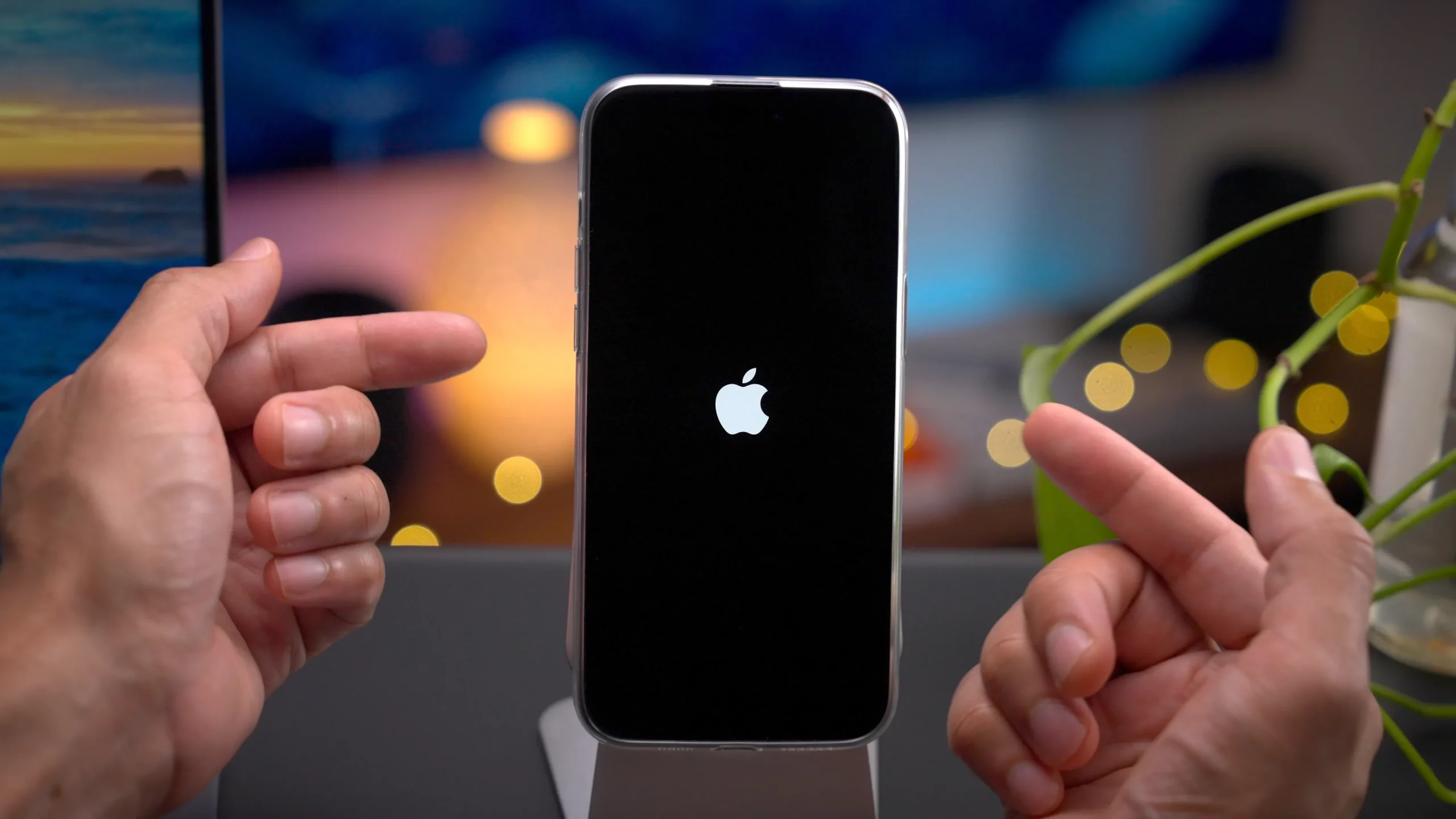
Ha iPhone ea hau e butsoe hape, kopanya sesebelisoa sa hau sa Bluetooth hape 'me u hlahlobe hore na se lula se hokahane.
2.3 Qala Sesebediswa sa Bluetooth botjha
Bothata e kanna eaba ha se iPhone ea hau ho hang.
Leka ho qala hape:
- Li-earbud tse se nang mohala
- Libui tsa Bluetooth
- Lioache tse bohlale
- Sistimi ea boithabiso ba likoloi
- Li-tracker tsa boikoetliso
Sesebelisoa se ka nchafatsa mojule oa sona oa Bluetooth le ho rarolla mathata a ho kopanya.
2.4 Lebala 'me u hokahanye sesebelisoa hape
Haeba sesebediswa se kopantsoeng se sentse data ya kgokelo, ho e tlosa le ho e kopanya hape ho ka thusa.
Mehato:
- Bula Litlhophiso > Bluetooth .
- Fumana sesebediswa se nang le bothata, tobetsa ke letšoao le pela lona, khetha Lebala Sesebelisoa Sena 'me u netefatse ho tlosoa.
- Kenya sesebelisoa sa Bluetooth mokgweng wa ho se kopanya hape le iPhone ya hao.
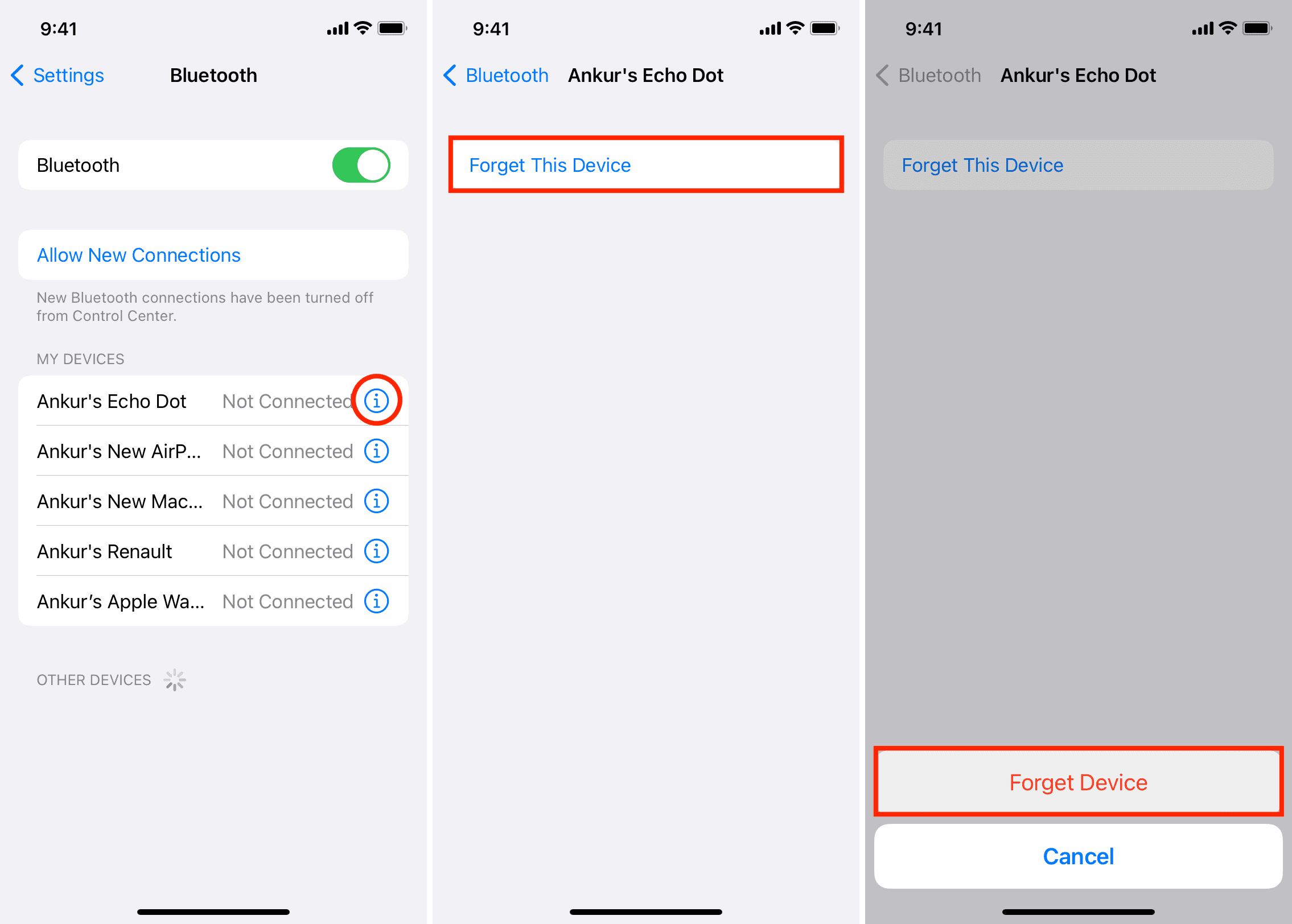
Sena se hlahisa profaele e ncha ea khokahano ea Bluetooth.
2.5 Hlahloba Maemo a Betri
Betri e tlase e ka ama botsitso ba Bluetooth.
Etsa bonnete:
- IPhone ea hau e na le matla a lekaneng a betri.
- Sesebelisoa sa Bluetooth se tjhajilwe ka ho lekaneng.
Disebediswa tse ding di tima Bluetooth ka boiketsetso ho boloka matla ha maemo a betri a theoha haholo.
6. Ntlafatsa iOS
Hangata Apple e lokolla lintlafatso tse kenyeletsang litokiso tsa liphoso le ntlafatso ea ts'ebetso ea Bluetooth.
Ho ntjhafatsa iPhone ea hau:
- Bula Litlhophiso , tlanya Kakaretso 'me u khethe Software Update .
- Khoasolla le ho kenya liapdeite life kapa life tse fumanehang.
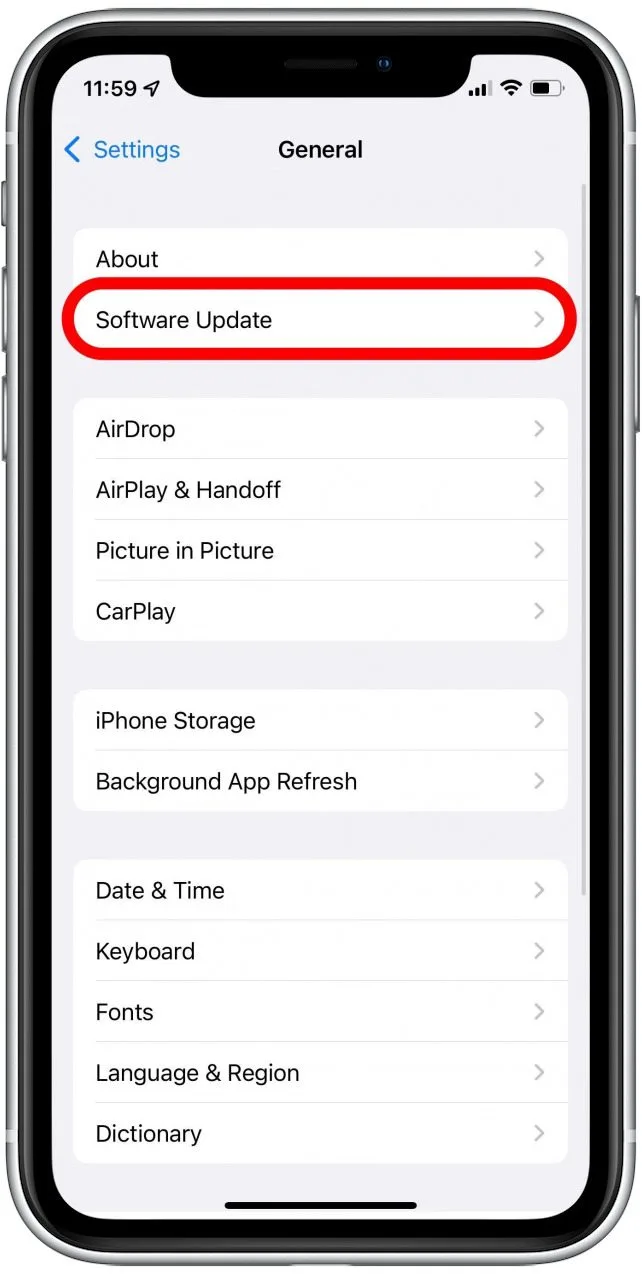
Ho boloka iOS e le teng ho ka rarolla mathata a mangata a khokahano.
2.7 Fokotsa Tšitiso ea Wireless
Bluetooth e sebetsa hodima leqhubu la maqhubu a 2.4 GHz, leo disebediswa tse ding tse ngata tse se nang mohala di le arolelanang, ho kenyeletswa:
- Li-router tsa Wi-Fi
- Lik'hamera tse se nang mohala
- Litebelisi tsa masea
- Maqhubu a microwave
- Lisebelisoa tse bohlale tsa lapeng
Leka ho tloha mehloding e ka bang teng ya tshitiso mme o bone hore na botsitso ba Bluetooth bo a ntlafala.
2.8 Seta Litlhophiso tsa Marangrang Bocha
Litlhophiso tsa Bluetooth li hokahantsoe ka karolo e itseng le tlhophiso ea marang-rang a hau. Ho seta bocha litlhophiso tsa marang-rang ho ka felisa likhohlano tse patiloeng.
Mehato:
- Eya ho Litlhophiso > Kakaretso > Fetisetsa kapa Reset iPhone , khetha Seta bocha , ebe o tobetsa Seta hape Litlhophiso tsa Marang-rang .
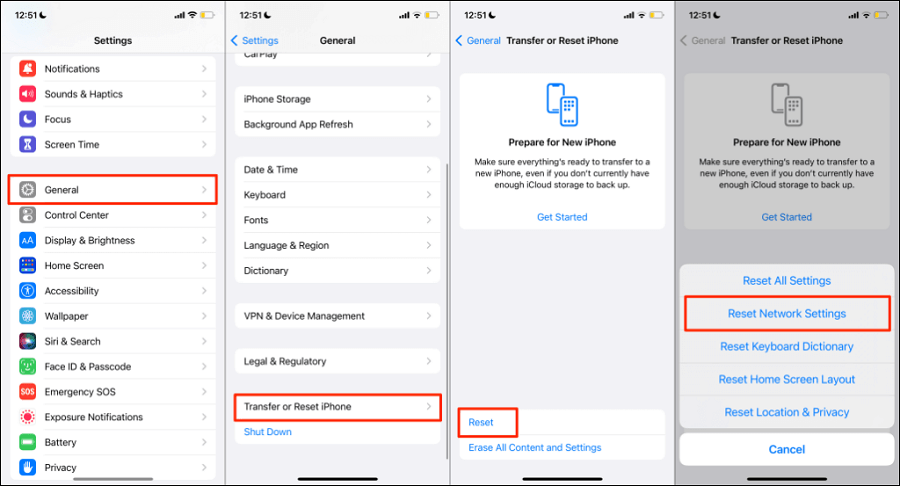
Hlokomela hore ho seta botjha di-setting tsa netweke ho tla tlosa di-password tsohle tse bolokilweng tsa Wi-Fi le di-configuration tsa VPN.
2.9 Thibela Mokhoa oa Matla a Tlase
Mokhoa oa Matla a Tlase o ka thibela lits'ebetso tsa morao 'me oa ama ts'ebetso ea Bluetooth.
Ho e tima:
- Bula Litlhophiso , tlanya Betri ebe o tima Mokhoa o tlase oa Matla .
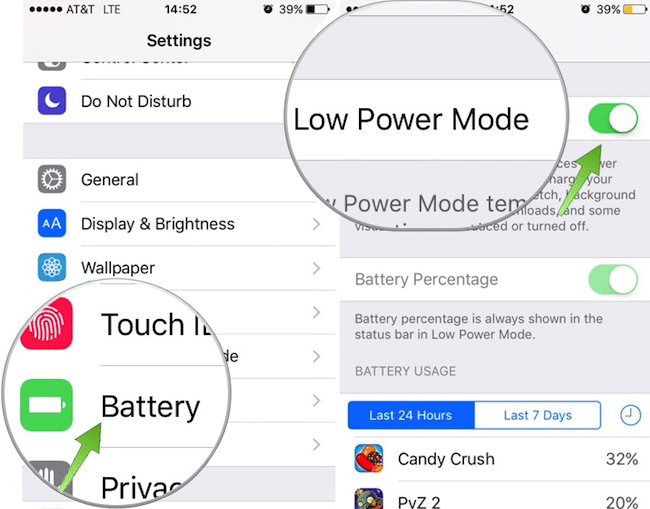
Ebe o leka khokahano ea Bluetooth hape.
2.10 Leka ka Sesebelisoa se seng sa Bluetooth
Ho fumana hore na bothata bo simoloha ho iPhone ea hau kapa sesebelisoa:
- Hokela sesebediswa se seng sa Bluetooth ho iPhone ya hao.
- Leka sesebelisoa sa mantlha ka fono e 'ngoe.
Sena se ka thusa ho fumana hore na bothata bo ipapisitse le sesebelisoa.
3. Lokisa Bluetooth ea iPhone e Tsoetseng Pele e Lula e Khaotsa ho Hokahana le AimerLab FixMate
Haeba o lekile ditharollo tsohle tse ka hodimo mme khokahano ya hao ya Bluetooth e ntse e fokotseha, bothata bo ka bakwa ke mathata a tebileng a sistimi ya iOS. Maemong a jwalo, sesebediswa sa profeshenale sa ho lokisa iOS se kang AimerLab FixMate e ka fana ka tharollo e felletseng haholoanyane.
Lintlha tsa bohlokoa tsa AimerLab FixMate:
- Lokisa liphoso tsa sistimi ea iOS tse fetang 200
- Mokhoa o Tloaelehileng oa ho Lokisa ntle le tahlehelo ea data
- Tokiso e tebileng bakeng sa mathata a tebileng a sistimi
- Kenya le ho tsoa Mokhoa oa ho Pholosa ka ho tobetsa hanngoe
- E tšehetsa lisebelisoa le mefuta ea morao-rao ea iOS
Mokhoa oa ho Lokisa Mathata a ho Khaotsa Bluetooth U Sebelisa FixMate:
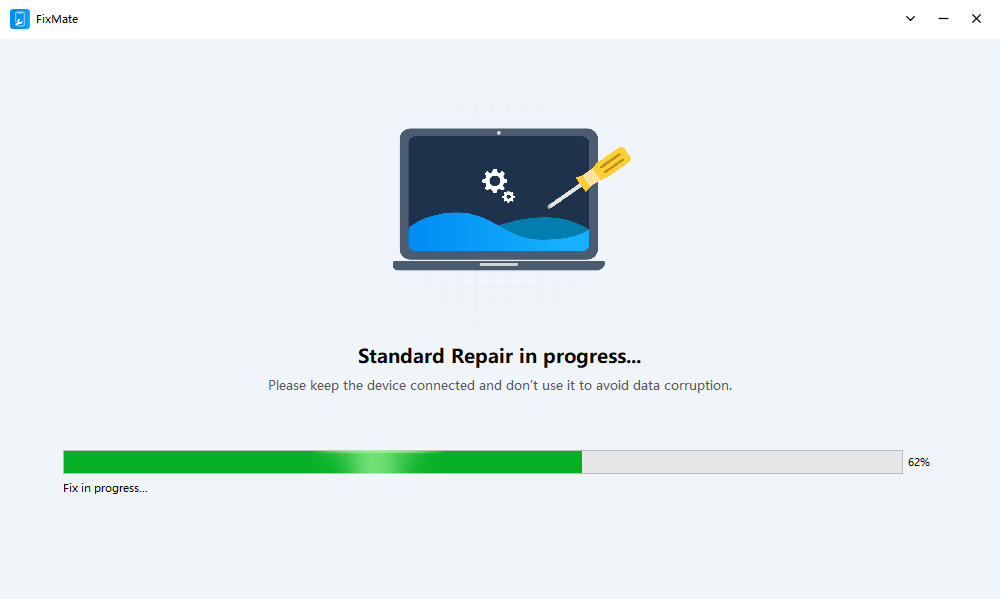
- Kenya le ho qala AimerLab FixMate khomphuteng ea hau, ebe u sebelisa thapo ea Lightning kapa USB-C ho hokela iPhone ea hau khomphuteng.
- Tobetsa Qala ebe o kgetha Tokiso e Tloaelehileng, ebe FixMate e tla lemoha sesebelisoa sa hau ka bohona mme e fane ka sephutheloana se loketseng sa firmware.
- Khoasolla firmware ebe o tobetsa ho qala ts'ebetso ea tokiso.
- Hang ha ts'ebetso e phethehile, iPhone e tla qala bocha, o ka hokela hape lisebelisoa tsa hau tsa Bluetooth mme o netefatse hore bothata ba ho kgaola bo rarollotsoe.
4. Qetello
Ho kgaolwa ha Bluetooth ho iPhone ho ka ferekanya, haholo-holo ha ho sitisa ho bapala mmino, mehala, boikoetliso, kapa mesebetsi ya letsatsi le letsatsi. Ka lehlohonolo, maemo a mangata a ka lokiswa ka ho qala disebediswa botjha, ho ntjhafatsa iOS, ho kopanya disebediswa tsa Bluetooth hape, ho seta botjha di-setting tsa netweke, kapa ho fokotsa tshitiso ya waelese.
Leha ho le jwalo, haeba Bluetooth e tswela pele ho kgaola ho sa tsotelehe mekgwa yohle e tloaelehileng ya ho rarolla mathata, bothata bo ka bakwa ke bobodu bo tebileng ba sistimi ya iOS. Maemong ana, AimerLab FixMate e fana ka tharollo e tshepahalang le e bonolo ho e sebedisa. Ka bokgoni ba yona ba ho lokisa mathata a sistimi ya iOS ntle le tahlehelo ya data, FixMate e ka rarolla mathata a kgokelo ya Bluetooth a manganga mme ya kgutlisetsa iPhone ya hao tshebetsong e tlwaelehileng. Bakeng sa basebedisi ba batlang tsela e potlakileng le e sebetsang ya ho lokisa mathata a Bluetooth a sa feleng,
AimerLab FixMate
e khothaletsoa haholo.
- Ke Hobane'ng ha iOS 26 e le Khutšoanyane Hakaale?
- Mokhoa oa ho lokisa "Ho bile le Phoso ho Netefatsa Khoutu ea Paskhoutu ea iPhone ea Hao"?
- Mokhoa oa ho lokisa bothata ba "Qetella ho iPhone e Ncha"?
- Mokhoa oa ho khoasolla iOS 27 Beta ho iPhone?
- Mokhoa oa ho Lokisa Faele ea iPhone e Stick on Ending?
- Mokhoa oa ho rarolla bothata ba sebui sa iPhone se se nang molumo?
- Joang ho Spoof Pokemon Go ho iPhone?
- Kakaretso ea Aimerlab MobiGo GPS Location Spoofer
- Mokhoa oa ho fetola sebaka ho iPhone ea hau?
- Top 5 Fake GPS Location Spoofers bakeng sa iOS
- GPS Location Finder Definition le Spoofer Suggestion
- Mokhoa oa ho fetola sebaka sa hau ho Snapchat
- Mokhoa oa ho Fumana / Abelana / Pata Sebaka ho lisebelisoa tsa iOS?